Apple TV+

In terms of streaming services, Apple TV+ is still taking baby steps while some of its rivals have been setting a good clip for years now. While competitors like Netflix have been streaming content to viewers since 2007, Apple TV+ only just joined in the rabble in late 2019. This being said, I still don’t believe the service is given enough critique for how it has dragged in development since its debut.
Apple began tiptoeing into the market around 2007 when it released the first rendition of the Apple TV in early 2007 (the hardware older sister of Apple TV+). The Apple TV was quite simply a media player that originally allowed streaming of YouTube videos but evolved over the years to incorporate all major streaming platforms that you know today – Netflix, Hulu, Amazon Prime Video, Spotify. With this foyer into the industry, one would expect that Apple would have picked up a couple of tricks or forewarnings from its future competitors. Based on the variety of basic issues that you still see with the app (both on the macOS app as well as the iOS app) this seems not to be the case.
| Streaming Service | Streaming Start Year |
|---|---|
| HBO Max | 2020 |
| Peacock | 2020 |
| Apple TV+ | 2019 |
| Disney+ | 2019 |
| Netflix | 2007 |
| Hulu | 2007 |
| Amazon Prime Video (Originally “Amazon Unbox”) | 2006 |
| Crunchyroll | 2006 |
| YouTube | 2005 |
| Funimation | 1994 |
The macOS app is clearly the worst of the two – which makes sense from a focus perspective seeing as most users are streaming content from their smartphones as opposed to a computer [https://www.statista.com/statistics/784351/online-video-devices/]. Despite this, it still deeply annoying when transient little issues cause degradation of the viewing experience on a larger screen. When a user is trying to watch on their laptop, they are likely more invested in the experience. So when the margins of the video player or the cursor won’t vanish and distract from the experience, it becomes irritating and makes it very difficult to focus. Couple with this the random issues that pop up around switching between fullscreen and picture-in-picture (PIP) and the not-very-infrequent problem where the audio continues streaming but the player disappears entirely, and you have an infuriating user experience on your hands.
The iOS app is not too dissimilar. The most glaring issue is that the app doesn’t lock the video view into landscape mode when Portrait Orientation Lock is turned on. Every other major application that supports a fullscreen player view (literally every single one – I’ll owe you a drink if you can find another) will take the video onto its side when the button for fullscreen is tapped and keep it locked into that position. Apple TV+ merely pops the video out onto a black background and has you watch the shrunk video in the center third of the screen. This is absolutely unacceptable for any application that streams video – there’s not a single use case for the application to do this. With any other streaming application you would see the video go fullscreen and – assuming orientation lock is enabled – the video would remain oriented on its side in spite of any jostling the phone undergoes. Thus, the only way to watch a truly fullscreen video on Apple TV+ is by turning off Portrait Orientation Lock.
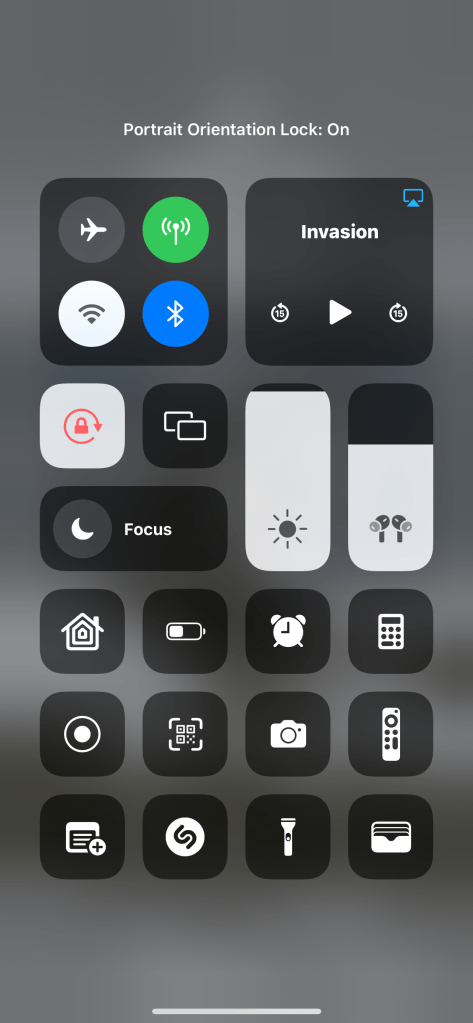
However, this comes with one huge caveat: you can’t turn the phone while watching as it can rotate the video out of the fullscreen player and back into the mini-view. This is antithetical to how we’ve been trained to use our phones – millions of people will watch videos laying on their sides on the couch or might rotate it accidentally while trying to adjust the phone’s position while trying to simultaneously cook, take notes, clear their desk, etc. When you think about the fact that this is an application developed by Apple that is failing to respect the spirit of a toggle created by Apple on an Apple device, this issue goes from irksome to just downright embarrassing.
When entering a saturated market, it’s important that you’re throwing a whole hat in the ring, not just a visor. The concept of an MVP doesn’t apply when you’re developing a product that has already had its proof of concept proven time and time again over the last decade or so. We know people like to stream – it’s obvious at this point that it’s not something that’s going away anytime soon. In these scenarios, it’s important that you don’t just develop the basic functionality but you build in delighters and differentiators as a Day 1 offering (or at least a fast follow). Streaming platforms do circumvent this rule slightly as there is one important distinction that they usually bring to the table: exclusive content. Giants like Apple and Netflix can afford to develop their own series or shows and drive traffic by the quality of their content alone – encouraging users to bypass some of the software gore in the apps as they don’t have an alternative way to watch that specific stream. However – as the old adage goes – you don’t want to put all of your eggs in the same basket. If the business puts too much faith into the hands of the content creators, then any degradation in quality of what the platform has to offer will be met with sharp drop-off as users won’t be willing to put up with a garbage UX. As with software development across all industries – there’s a balance that has to be struck and Apple TV+ just might not have found it quite yet.
 Deniz Dezignz